
When the Buy Box disappears, revenue often evaporates with it. A strong Amazon listing can lose most of its sales overnight due to Buy Box suppression, even when the product hasn’t changed, inventory is available, and the seller’s price matches every authorized channel.
Amazon Buy Box suppression can happen when Amazon’s competitive pricing system decides the item is cheaper elsewhere online, even when that comparison is wrong. The result is lost visibility, paused advertising, and pressure to accept a price that may erase your margin.
Key Takeaways
- Amazon checks external prices to support price parity, but its comparisons can be inaccurate.
- A suppressed Buy Box makes an offer far harder to purchase and can stop Amazon ads from serving.
- Incorrect matches may involve smaller sizes, different products, or lookalike knockoffs on sites such as Temu.
- Sellers need to document their actual market price, submit evidence through Seller Support, and keep escalating.
- Lowering a price to satisfy an incorrect comparison can damage profitability and limit future deal eligibility.
Why Amazon Suppresses Listings for Competitive Pricing
Amazon wants shoppers, especially Prime members, to feel confident that they are receiving a competitive price without searching other retail sites. That goal is reasonable when Amazon compares an identical product, sold in the same quantity, against the same product on another authorized marketplace.
Historically, these comparisons often centered on UPC codes. A seller offering the same UPC for $5 less on Walmart, for example, could reasonably expect Amazon to question the higher Amazon price.
Now, Amazon’s automated systems appear to compare offers across major retailers and marketplaces, including Walmart, Target, Home Depot, eBay, Etsy, TikTok Shop, Shein, Temu, and sellers’ own direct-to-consumer websites. The problem begins when the system moves beyond a true UPC-to-UPC comparison.
When the Comparison Is Not Apples to Apples
Sellers report that Amazon’s system can match products based on incomplete data or visual similarity instead of an exact item match. That leads to pricing demands that don’t reflect the product being sold.
Common errors include:
- Comparing a large package to a smaller package of the same brand
- Matching a branded product with a different brand’s item
- Treating a low-cost knockoff as a competing offer
- Calculating a per-ounce or per-unit price incorrectly
- Referencing an unauthorized reseller’s discounted listing
A 2-pound jar of a product could be compared to a 7-ounce jar sold at a lower total price. If Amazon treats the smaller product’s price as the benchmark, it may demand a price that the larger item cannot support.
A competitive-price comparison only works when the products, sizes, and terms of sale are genuinely the same.
What Happens When You Lose the Buy Box
Amazon may say your listing remains available, but a suppressed offer loses the prominent purchase option on the detail page. Shoppers may need to open the “other sellers” area to find the offer, a step many won’t take.
The sales impact becomes more severe for brands that rely on paid traffic. Amazon ads generally won’t run when your offer doesn’t hold the Buy Box. That means Sponsored Products and other campaigns can stop delivering, even while inventory sits in FBA.
Lowering the price isn’t always a practical response. After referral fees, FBA fulfillment charges, storage, inbound freight, and cost of goods, a forced price reduction can put an item underwater. A seller may be asked to match a number that no authorized seller could profitably offer.
There is also a longer-term cost. Amazon deals often require the promotional price to meet rules tied to recent pricing history. If you lower the everyday price under pressure, you can weaken the baseline needed for a Prime Day, Black Friday, or other major promotion.
A Controlled Product Can Still Be Suppressed
One eComCatalyst-managed grocery product illustrates the problem. The brand created a 2-pound bulk SKU and restricted it to three channels: Amazon, Walmart.com, and its own Shopify store. The item was priced at $20 across all three locations.
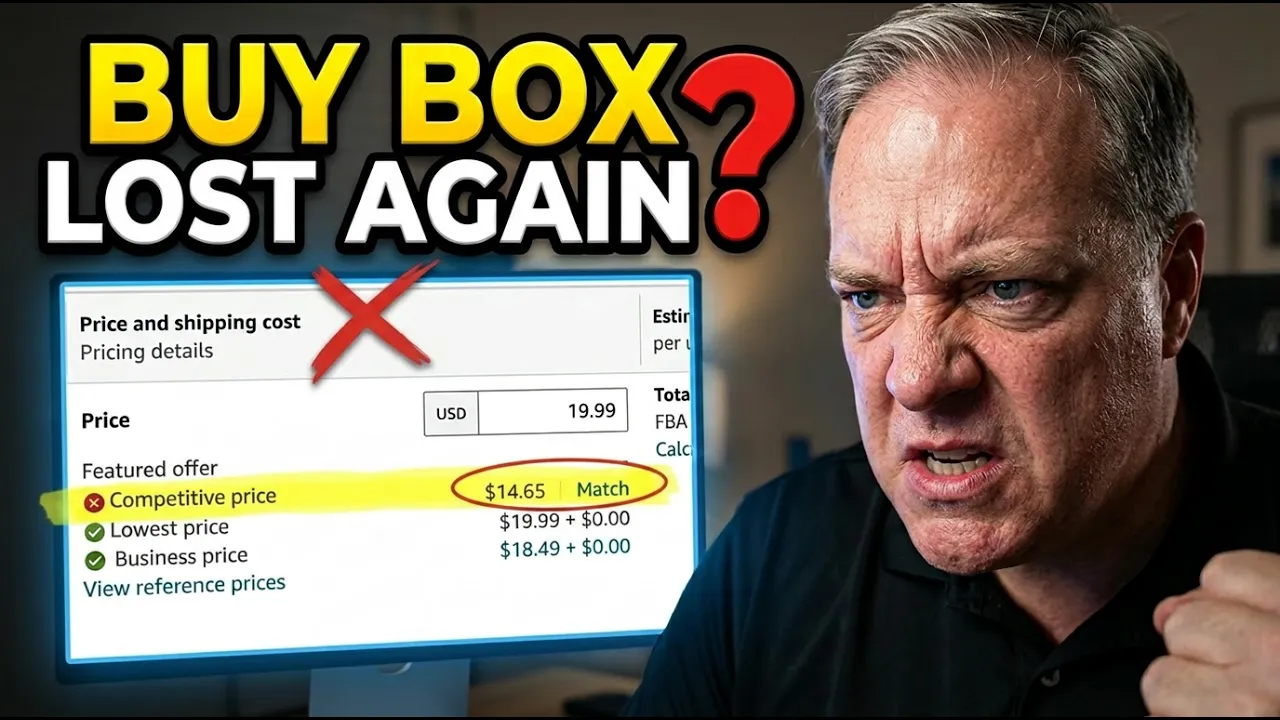
Despite that controlled distribution, Amazon repeatedly removed the Buy Box over roughly three months. Amazon’s internal competitive-price field showed inconsistent figures, including prices around $9, $14, and other amounts below the actual $20 market price.
The product page remained live, but its best-selling offer cycled in and out of Buy Box eligibility. Alerts from Helium 10 helped track the timing of each loss and restoration. Monitoring tools can also flag title changes, listing issues, profitability shifts, and advertising concerns before they become a larger revenue problem.
Even when a brand controls every authorized sales channel, Amazon may still identify a price it won’t disclose or explain.
How to Respond to Amazon Buy Box Suppression
Start by verifying whether the lower price is real. Search the product’s UPC in Google Shopping and review the results carefully. If a lower listing belongs to an unauthorized reseller, Amazon may treat it as a legitimate competitive signal, even though the brand did not authorize the sale.
When Amazon’s comparison is wrong, build the case for the support team instead of relying on a short explanation.
- Collect the live product links. Include every authorized store where the exact SKU is sold, such as Amazon, Walmart, and your Shopify site.
- Capture dated screenshots. Mark the product name, package size, and visible price. Make it easy for a reviewer to see that the item sells at your stated price or higher.
- Search the UPC in Google Shopping. Screenshot the results page and highlight relevant merchants and prices. This can show the broader market context for the exact product.
- Open and update Seller Support cases. State that the competitive price is incorrect, attach the evidence, and document the date and time of every Buy Box suppression.
- Request escalation when needed. Tier-one responses may be templated and may not address the evidence. Escalation specialists can acknowledge that an error exists, although the internal competitive pricing team may still provide little visibility.
Amazon often doesn’t identify the website or offer behind its claimed competitive price. That leaves sellers trying to disprove an allegation without seeing the underlying comparison. Keep case notes, screenshots, and links organized so each follow-up is clear and consistent.
Watch for Temu Lookalikes and Unauthorized Resellers
Some sellers believe Amazon is comparing their products with visually similar items on Temu or other discount marketplaces. A knockoff may resemble the original product in photos while using a different brand, formula, quality level, UPC, or package size.
That comparison makes no commercial sense for a brand owner, yet it can still affect Buy Box eligibility. Amazon Seller Forums contain repeated reports from manufacturers and sole sellers whose listings were suppressed against unrelated products.
Pricing pressure has also drawn wider scrutiny. Business Insider has covered seller concerns tied to price increases and tariff uncertainty, while The Guardian and Wired have reported on allegations and debates around Amazon’s pricing practices. Those reports don’t solve an individual case, but they show that competitive pricing disputes reach beyond small sellers.
Keep Margin Control Outside Amazon
Amazon may remain the largest sales channel for many brands, but it shouldn’t be the only place where a business can sell. A stronger Walmart presence, a Shopify store, and carefully managed marketplace distribution give brands more control when Amazon’s systems create friction.
Before reducing a price, calculate the full cost of the sale. Amazon fees can absorb a significant share of revenue before product cost is included. A Buy Box win that loses money is not a sustainable recovery.
Frequently Asked Questions
Can you still sell when Amazon suppresses the Buy Box?
Yes, the listing can remain active. However, customers may need to locate your offer under other available sellers, which usually reduces conversion and visibility.
Why did Amazon suppress my Buy Box if my price is correct?
Amazon may have found a lower external price, or it may have made an incorrect match. Errors can involve product size, unit count, an unauthorized reseller, or a similar-looking product that isn’t yours.
Should you match Amazon’s competitive price?
Only if the comparison is accurate and the price still supports your margin. A rushed price cut can create losses and interfere with future deal pricing.
What evidence should you send Seller Support?
Provide links and annotated screenshots from authorized sales channels, plus Google Shopping results for the product UPC. Show the exact product size and the price on each page.
Keep Documenting and Keep Pressure on the Case
Amazon Buy Box suppression over a false competitive price can cut off both organic sales and paid traffic, even when a brand maintains consistent pricing across its authorized channels. The most practical response is persistent documentation, frequent case updates, and clear evidence that Amazon’s comparison is wrong.
Don’t accept a loss-making price simply to restore short-term visibility. Protect the margin, record every suppression event, and keep building sales channels that are not dependent on one marketplace.
Subscribe to eComCatalyst on YouTube for practical Amazon selling guidance, and schedule a free consultation through the eComCatalyst site to discuss your brand’s Amazon account challenges.